Best File Hosting Services 2026: Top Sites Compared
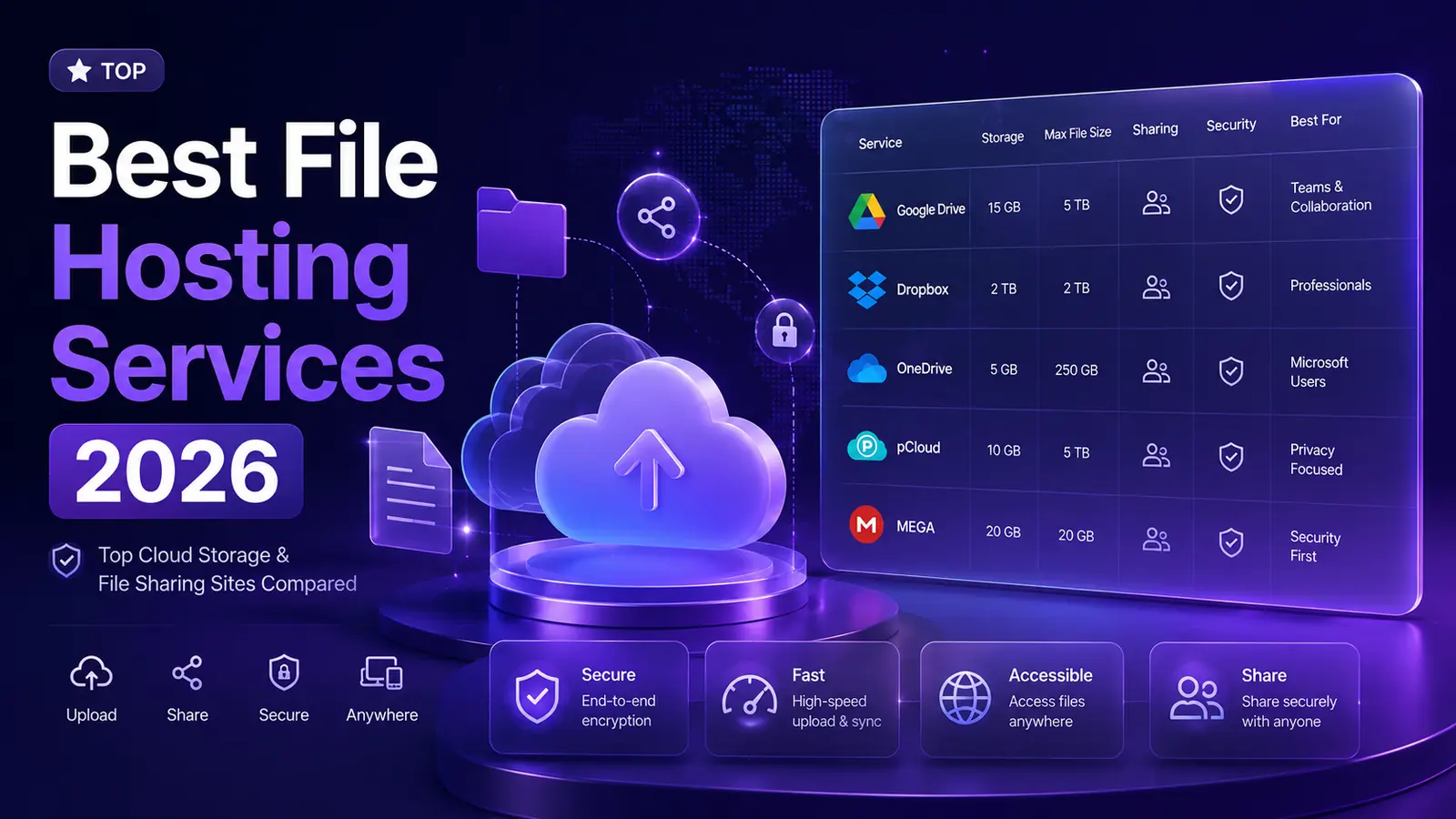
Quick answer: The best file hosting services in 2026 pair a useful free tier with strong security and fast sharing — Google Drive for teams, Dropbox for sync, MEGA and pCloud for privacy, MediaFire for simple free downloads, and fii.one for a secure workspace with fast search, preview and private sharing.
For a search-first workflow, compare this list with our guide to the best file hosting search engine and learn how to find files online faster.
The best file hosting services in 2026 combine a useful free tier, strong security and fast sharing. Top picks include Google Drive for everyday collaboration, Dropbox for reliable sync, MEGA and pCloud for privacy, MediaFire for simple free sharing, and fii.one for a secure workspace with fast file search, preview and controlled sharing.
Use this guide to compare free storage, max file size, security and best use cases, then pick the file hosting service that fits how you share and store files.
Why fii.one Is a Strong File Hosting Service
Most file hosting services store files. fii.one is a secure file workspace built to store, find, preview and share your files without exposing your whole library.
- Fast file search: find files by filename, document text and AI semantic meaning, not just folders.
- Preview before sharing: open files in the browser and confirm the right version before sending a link.
- Secure sharing: create private share links and folders with control over who can access what.
Best File Hosting Services: Short Answer
For most people the best file hosting service is the one that matches intent: Google Drive for collaboration, Dropbox for sync reliability, MEGA or pCloud for privacy-first storage, MediaFire for quick free downloads, and fii.one when you want a secure workspace with fast search, preview and private sharing for your own files. Compare free tier, max file size and security before you commit.
Top File Hosting Websites for Easy File Sharing and Storage
Discover the best file hosting websites for seamless file sharing, storage, and collaboration. Choose the right platform for your needs.
Quick answer: what is the best file hosting website?
There is no single best file hosting website. The right choice depends on one decision first: are you trying to host a file so anyone on the public internet can download it from a link, or are you trying to store and sync private files in your own cloud or local space? Those are two different jobs, and the services that win at one are usually mediocre at the other.
- Public sharing and download links — you want a fast, no-friction link anyone can open: fii.one, MediaFire, WeTransfer, Dropbox public links.
- Private cloud storage and sync — you want your own files available across devices: Google Drive, OneDrive, iCloud, pCloud.
- Zero-knowledge private storage — you want the provider unable to read your files: Proton Drive, Tresorit, Internxt, MEGA.
- Finding files that already exist — you are searching, not hosting: fii.one Search for files across hosting services, Google Drive search inside your own account, and Everything for files on your local disk.
If you already know the file exists somewhere but cannot find it, start with a file hosting search engine instead of signing up for another storage plan.
What is a File Hosting Website?
A file hosting website is an online service that allows users to upload, store, and share files. These platforms provide users with a secure environment to manage their data, whether it's documents, images, videos, or any other type of file. With the increasing demand for digital storage solutions, file hosting websites have become essential tools for personal and professional use.
Benefits of Using File Hosting Websites
Utilizing a file hosting website offers numerous advantages. Here are some key benefits:
- Easy Accessibility: Access your files from any device with an internet connection.
- Collaboration: Share files easily with colleagues, friends, or clients, facilitating teamwork.
- Backup and Recovery: Protect your important files from loss with automatic backups.
- Cost-Effective: Many file hosting services offer free or low-cost plans suitable for various needs.
- Security: Most platforms provide encryption and other security features to safeguard your data.
💡 Key Insight: Choosing the right file hosting website can significantly enhance your productivity and ensure the safety of your data.
Top File Hosting Websites to Consider
When selecting a file hosting website, it is crucial to consider factors such as storage capacity, user interface, and security features. Here are some of the top options available today:
🌐 Google Drive
Google Drive offers 15 GB of free storage and integrates seamlessly with Google Workspace, making it ideal for collaboration.
☁️ Dropbox
Dropbox is known for its user-friendly interface and robust file synchronization features, offering 2 GB of free storage.
📁 OneDrive
Microsoft's OneDrive provides 5 GB of free storage and is ideal for users within the Microsoft ecosystem.
📦 Box
Box is tailored for business users, offering extensive collaboration features and 10 GB of free storage.
Best Practices for Using File Hosting Websites
To maximize the benefits of your chosen file hosting website, consider these best practices:
- Organize Your Files: Create a folder structure that makes it easy to locate files quickly.
- Regularly Update: Keep your files up to date and remove any unnecessary ones to save space.
- Utilize Sharing Features: Make use of sharing options to collaborate effectively with others.
- Backup Important Files: Consider keeping copies of essential documents elsewhere for added security.
- Stay Informed: Keep up with any changes in policies or features offered by your file hosting provider.
File Hosting Websites: A Comparison
Here’s a quick comparison of some leading file hosting websites based on various criteria:
| Service | Free Storage | Best For | Security Features |
|---|---|---|---|
| Google Drive | 15 GB | Collaboration | Two-factor authentication |
| Dropbox | 2 GB | Ease of Use | File recovery options |
| OneDrive | 5 GB | Microsoft Users | Personal vault |
| Box | 10 GB | Business | Encryption |
How to Choose the Right File Hosting Website
Picking the best file hosting website is rarely a one-size-fits-all decision. The right platform for a solo freelancer looks very different from the one a 200-person company uses to manage shared assets. Use the checklist below to compare candidates side by side against a consistent set of criteria. The more of these boxes a service ticks for your specific workflow, the more likely it is to become a tool you actually keep using.
- Storage limits: Estimate your real needs and add headroom for growth. A 2 GB free tier disappears fast once you start storing video, raw photos, or design files.
- File size caps: Many services quietly limit the size of a single upload. If you regularly move large video exports, backups, or ZIP archives, confirm the per-file ceiling before you rely on the platform.
- Security and encryption: Look for encryption in transit (TLS) and at rest, plus optional end-to-end or zero-knowledge encryption if you handle sensitive material. Two-factor authentication should be available at minimum.
- Sharing features: Shareable links, password-protected links, link expiration dates, and granular view/edit permissions separate a serious collaboration tool from a basic storage locker.
- Pricing and value: Compare the cost per gigabyte, not just the headline price. Watch for annual discounts, bandwidth caps, and whether features you need are gated behind higher tiers.
- Speed and reliability: Upload and download throughput, server locations near your users, and a solid uptime track record all affect day-to-day usability far more than a long feature list.
- Platform integration: Native desktop sync clients, mobile apps, and integrations with the tools you already use (office suites, Slack, design apps) reduce friction and keep files where you need them.
A practical approach is to shortlist two or three services, sign up for their free tiers, and run a one-week trial using real files from your workflow. The platform that feels invisible — where uploading, finding, and sharing files just works — is usually the right long-term choice.
Free vs Paid File Hosting: What's the Difference
Almost every major file hosting website offers a free tier, and for many casual users that allowance is genuinely enough. Free plans are designed as an on-ramp: they give you a taste of the service with enough capacity for light personal use, but they typically restrict the features that matter most for heavier or professional workloads. Paid plans remove those restrictions and add tools built for collaboration, control, and scale. Understanding where one stops and the other begins helps you avoid both overpaying and hitting frustrating walls at the worst possible moment.
- Storage capacity: Free tiers usually range from 2 GB to 15 GB. Paid plans commonly start at 100 GB to 2 TB and scale into the terabytes for teams.
- File size and bandwidth: Free accounts often cap individual upload sizes and may throttle download bandwidth on shared links. Paid plans raise or remove these limits.
- Advanced sharing: Password-protected links, link expiry, download limits, and detailed permission controls are frequently paid-only features.
- Version history and recovery: Free tiers may keep deleted files for 30 days; paid tiers often extend recovery windows to 180 days or more, which can save you from costly mistakes.
- Security and admin controls: Team management, audit logs, single sign-on, and stronger encryption options are typically reserved for paid business plans.
- Support: Free users usually get community forums and help articles, while paying customers gain priority email or live support.
The smart move is to start free, learn how you actually use the service, and upgrade only when you repeatedly bump into a specific limit. Paying for storage or features you never touch is one of the most common ways people waste money on cloud services.
Security and Privacy Considerations When Hosting Files
When you upload a file to a hosting website, you are trusting a third party with your data. For holiday photos that trust is low-stakes, but for contracts, financial records, or proprietary business files, security and privacy become critical. Strong platforms combine multiple layers of protection, and understanding the terminology helps you compare services honestly rather than trusting marketing claims at face value.
- Encryption in transit: TLS/SSL encrypts files as they travel between your device and the server, preventing interception on public or insecure networks.
- Encryption at rest: Files stored on the provider's servers are encrypted so that a physical or database breach does not expose readable data.
- Zero-knowledge encryption: With end-to-end or zero-knowledge services, only you hold the keys — not even the provider can read your files. This is ideal for highly sensitive material but can complicate password recovery.
- Two-factor authentication (2FA): Adding a second login step dramatically reduces the risk of account takeover even if your password is leaked.
- Access controls: Use expiring links, password-protected shares, and view-only permissions instead of open public links whenever possible.
🔒 Privacy Tip: Read each provider's privacy policy to understand where servers are located and which data protection laws apply. Jurisdiction matters for compliance with regulations like GDPR.
Finally, remember that the strongest encryption cannot protect a weak password or a careless share. Use a unique, complex password (ideally from a password manager), enable 2FA, double-check who can access each shared link, and revoke access when a project ends. Good habits on your side complete the security picture that the platform starts.
File Hosting for Different Use Cases
The "best" file hosting website is the one that fits how you actually work. Different users have very different priorities, and a platform that delights a video editor might frustrate a software team. Here is how to match services to common scenarios.
- Personal use: If you mainly back up photos, documents, and the occasional video, prioritize a generous free tier, automatic mobile backup, and an easy-to-use interface. Seamless syncing across your phone and laptop matters more than enterprise features.
- Business and teams: Companies need shared workspaces, granular permissions, admin dashboards, audit logs, and single sign-on. Reliability and support response times become as important as raw storage, since downtime directly costs productivity.
- Media and creative work: Photographers, videographers, and designers move enormous files. Look for high per-file size limits, fast upload speeds, large-file preview support, and link sharing that lets clients download without an account.
- Developers and technical users: Developers often want API access, command-line tools, programmatic uploads, and integrations with build pipelines. Object storage and direct download links for assets or releases are frequent requirements.
- Students and educators: Easy collaboration, real-time document editing, and free institutional plans make integrated office suites particularly attractive for coursework and group projects.
Many people end up using more than one service — a mainstream sync tool for everyday documents and a specialized platform for large media or technical assets. There is nothing wrong with this layered approach as long as you keep your file organization consistent so nothing gets lost between platforms.
Frequently Asked Questions
What is the difference between file hosting and cloud storage?
The terms overlap heavily. Cloud storage emphasizes keeping and syncing your files across devices, while file hosting emphasizes making files available to share with others via links. Most modern services do both, so the distinction is largely about which feature you rely on most.
How much storage do I actually need?
For documents and light personal use, 15 GB to 100 GB is plenty. Photo libraries and casual video push you toward 200 GB to 1 TB. Professional media work or whole-system backups can easily require 2 TB or more. Estimate your current usage and double it for headroom.
Can I host large files for free?
Yes, but with limits. Free tiers cap both total storage and individual file size, and may throttle download bandwidth on busy shared links. For occasional large transfers a free plan works; for regular large-file delivery, a paid plan is more reliable.
Is it safe to store sensitive documents online?
It can be, provided you choose a reputable provider with encryption at rest and in transit, enable two-factor authentication, and use strong unique passwords. For the most sensitive files, pick a zero-knowledge service or encrypt the files yourself before uploading.
What happens to my files if I stop paying?
Policies vary. Most services downgrade you to the free tier and keep your files but block new uploads until you fall under the free limit, or set them to read-only. Some delete data after a grace period. Always check the provider's downgrade policy and back up critical files independently.
Can I recover a file I accidentally deleted?
Usually yes. Most platforms keep deleted files in a trash or recycle bin for a set period — often 30 days on free plans and longer on paid ones — along with version history that lets you roll back to earlier copies of a document.
What is the most secure file hosting website?
The most secure file hosting website can vary based on user needs, but services like Box and Google Drive offer advanced security features.
Can I use file hosting websites for free?
Yes, most file hosting websites offer free storage options, though these may come with limitations on storage space and features.
Are file hosting websites safe for sensitive data?
Many file hosting websites employ encryption and other security measures, but it's advisable to check individual policies and use additional protection for highly sensitive data.
How do I share files using a file hosting website?
Most file hosting websites allow you to generate shareable links or directly invite others to view or edit files, facilitating easy collaboration.
Can I access my files offline?
Some file hosting services offer offline access features, allowing you to download files for offline use; check the specific service for details.
Conclusion
In today's digital age, a reliable file hosting website is essential for anyone looking to manage their files efficiently. With various options available, it’s important to choose a service that aligns with your specific needs, whether personal or professional. By understanding the features and benefits of different platforms, you can make an informed decision that enhances your file sharing and storage experience.
Get Started with Your File Hosting Journey Today!
Explore the options mentioned and find the perfect file hosting website to streamline your file management process. Don't wait—choose the right platform for your needs!
If you also need to track down specific files across multiple platforms, see our guide to the best file hosting search engines. And if privacy is your priority, compare the top secure Google Drive alternatives before you commit.
HowTo
How to choose the best file hosting service
- 1
List what you need to store and share
Decide whether you mainly back up private files, collaborate with a team, send large files or publish public downloads. Your primary job determines which file hosting service fits best.
- 2
Compare free storage and file size limits
Check each service's free tier and maximum file size. MEGA and Google Drive lead on free space, while others cap upload size or bandwidth, so match the limits to your typical files.
- 3
Check security and sharing controls
Prefer services with encryption in transit and at rest, and granular sharing permissions. If privacy is critical, look at MEGA or pCloud; for controlled private sharing with preview, use fii.one.
- 4
Test the sharing and preview flow
Upload a real file and try sharing it. Confirm you can preview it in the browser, set who can access it and revoke access later — this is where fii.one focuses.
- 5
Pick one primary service, or combine two
Choose the service that matches your main job, and optionally pair it with a second for a specific need — for example a collaboration drive plus fii.one for secure search and sharing.
FAQ
Best file hosting services FAQ
What is the best file hosting service in 2026?
There is no single winner for everyone. Google Drive is best for collaboration, Dropbox for reliable sync, MEGA and pCloud for privacy, and MediaFire for simple free sharing. fii.one is best when you want a secure file workspace with fast search, in-browser preview and controlled private sharing.
What is the best free file hosting service?
Free tiers vary a lot: MEGA offers 20 GB, Google Drive 15 GB, pCloud up to 10 GB, and MediaFire and Dropbox smaller amounts. The best free file hosting service is the one whose free storage, file size limit and sharing rules match how you actually send files.
Which file hosting service is most secure?
Privacy-focused services such as MEGA and pCloud emphasise encryption, and business tools add access controls and audit trails. For your own files, choose a service with encryption in transit and at rest, granular share permissions and previews so you can verify files before sharing, like fii.one.
What is the difference between file hosting and cloud storage?
Cloud storage focuses on keeping and syncing your files across devices, while file hosting focuses on sharing files via links and downloads. Most modern services, including fii.one, Google Drive and Dropbox, do both — store your files and let you share them online.
How do I choose a file hosting service?
Compare free storage, maximum file size, security and encryption, ease of sharing, preview support and price. Match those against your main job — team collaboration, private backup, large-file transfer or public downloads — then pick the service that fits, or combine two.
Can I use fii.one to share large files?
Yes. fii.one lets you upload files to a secure workspace and share them with private links or folders, with preview so recipients can confirm the file before downloading, which is safer than posting open public download links.
Join thousands of users who trust fii.one for fast, private cloud storage.
Get Started Free →fii.one Team
The fii.one blog brings you guides, tips, and insights on file storage, sharing, and productivity.
← Previous
Top Open Source Google Drive Alternatives for 2024
Next →
Top Google Drive Alternatives for 2024: Secure & Affordable
Related Articles

Best File Hosting Search Engines: Find Files Fast in 2026
11 min read

How to Search Files Across MediaFire, Mega & Google Drive in One Place
3 min read

Best Enterprise Dropbox Alternative for Secure File Sharing
8 min read

Understanding Airdrop File Size Limits: What You Need to Know
4 min read